
Accounting
Integration
Company: Brim Financial
Role: Product Designer
Tools Used
Problem
In the first version of Brim’s Accounting Integration, businesses could sync their transactions directly to QuickBooks but the experience fell short of what accountants needed. The system pulled only the data available on the Brim platform, with no opportunity for users to review or adjust transactions before export.
As a result, businesses found themselves dealing with unexpected changes in their QuickBooks environment like new records being created or data landing in the wrong places. What was meant to simplify reconciliation ended up creating more work, more cleanup, and more frustration.
For accounting teams who rely on precision and control, this lack of visibility and customization made the integration more of a burden than a benefit. It became clear that if we wanted this feature to truly support our users, we needed to give them more control, flexibility, and confidence in the process.
Outcome
The final version of Brim’s Accounting Integration brought clarity and structure to the entire export process, allowing users to track transactions as they moved through defined stages from Not Exported to Pending, Error, and finally Exported. This visibility addressed confusion around transaction status, reduced mismatches in QuickBooks, and significantly cut down on the manual cleanup previously required after export.
Role & Responsibilities
I worked closely with our engineering team to dig into how transactions were being pulled through the API and where things were breaking down during export to QuickBooks. Together, we identified the root causes behind mismatched data and found clear opportunities to simplify the process. By improving how data was validated and giving users more control before export, we were able to reduce errors and make the entire experience smoother and more intuitive for accountants.
Problem
Brim automatically mapped the merchant field in transactions to the Vendor field in QuickBooks using the DBA (Doing Business As) name from the transaction data.
The DBA name often includes extra metadata (e.g., store numbers, transaction IDs), leading to slight variations in the vendor name across transactions. Since QuickBooks relies on exact matches for vendor names, these variations resulted in the creation of multiple, unintended vendor records, even when all transactions came from the same merchant (e.g., “Walmart #123” vs. “Walmart #456”).


Table Display and Navigation
As the requirements for the Accounting Integration feature grew from it’s initial design, the constants of different breakpoints made displaying the information more cluttered and difficult to visualize.


Filtering
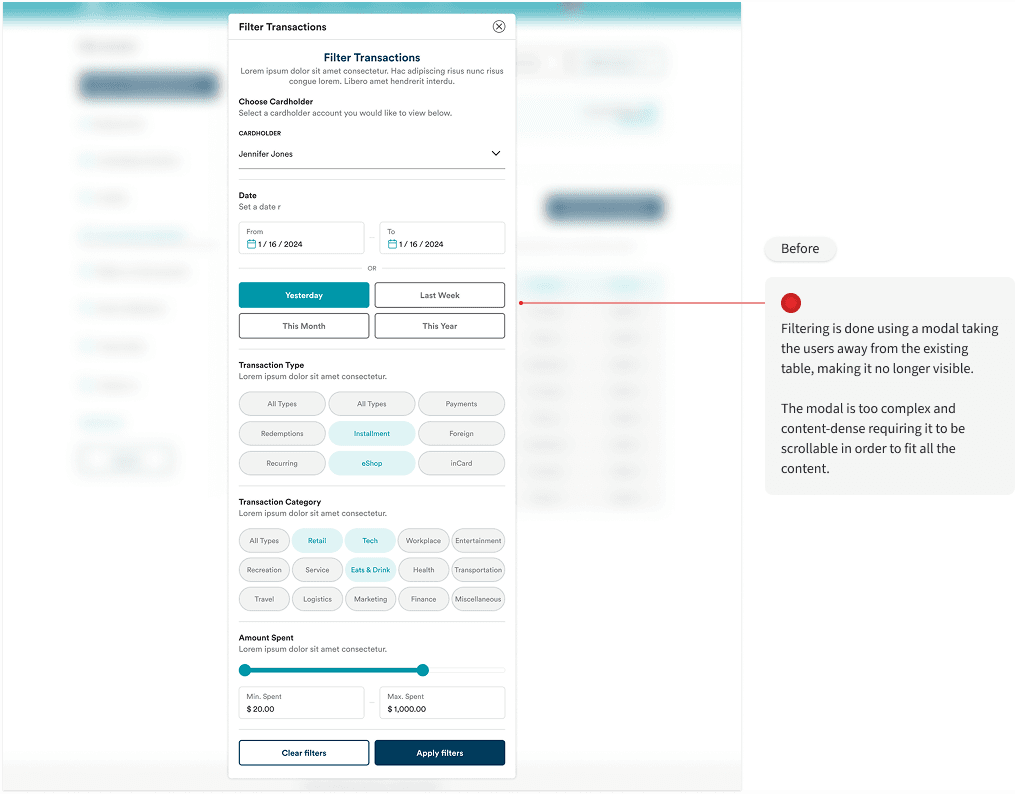
As part of the updated for Accounting Integration, existing users found it difficult interacting with the filter without having visibility on the table content at the same time.

Not Exported, Pending Transaction, Errors, & Exported Transactions
As part of the updated for Accounting Integration, existing users found it difficult interacting with the filter without having visibility on the table content at the same time.


© 2026 Silvia Be. All Rights Reserved.